
Zorro Fi
In progress
reducing friction and increasing user confidence across key touchpoints.

Industry
Fintech
My Role
Product Designer
Skills Utilized
User Research
User Interviewing
Product Strategy
Stakeholder Communication
What is ZorroFi?
In simple terms — ZorroFi is a fintech startup that helps small banks approve loans faster by reducing fraud and making sure loan applications are truly complete before underwriters review.
In more detailed terms — ZorroFi validates every application at intake, running fraud checks, verifying documents, and completing KYC/KYB, so lenders receive clean, audit-ready loan packages without changing their core systems or LOS. ZorroFi's core product is an AI-assisted loan application that guides small business owners through submitting documents, validating identity, and ultimately producing a clean loan package for banks.
Challenge
The onboarding experience had a clarity gap:
Users completed what appeared to be the application…
Only to discover after finishing… that there were two more phases.
This created surprise, frustration, and risked drop-off at a high-trust financial moment.
Users thought they were “done” when they weren’t.
Solution
I redesigned the onboarding experience to clearly communicate the full three-phase journey upfront, while still keeping each phase focused and manageable. A high-level progress tracker set expectations early, paired with a lightweight progress indicator to maintain momentum within each phase.
Key Outcomes
Delivered 48 actionable recommendations that became the foundation of Valence's 2025 product roadmap:
Enhanced user confidence
Redesigned AI interaction patterns with clearer feedback loops
Enhanced user confidence
Redesigned AI interaction patterns with clearer feedback loops
Enhanced user confidence
Redesigned AI interaction patterns with clearer feedback loops
01
Understanding the Problem
A Three-Phase Flow with Shifting Ownership
The loan application followed a three-phase structure, with responsibility moving between the applicant and the lender:
Applicant submits information and documents
Lender reviews and validates the application
Applicant finalizes and submits remaining paperwork
Operationally, this made sense, but it wasn't currently visible to the user.
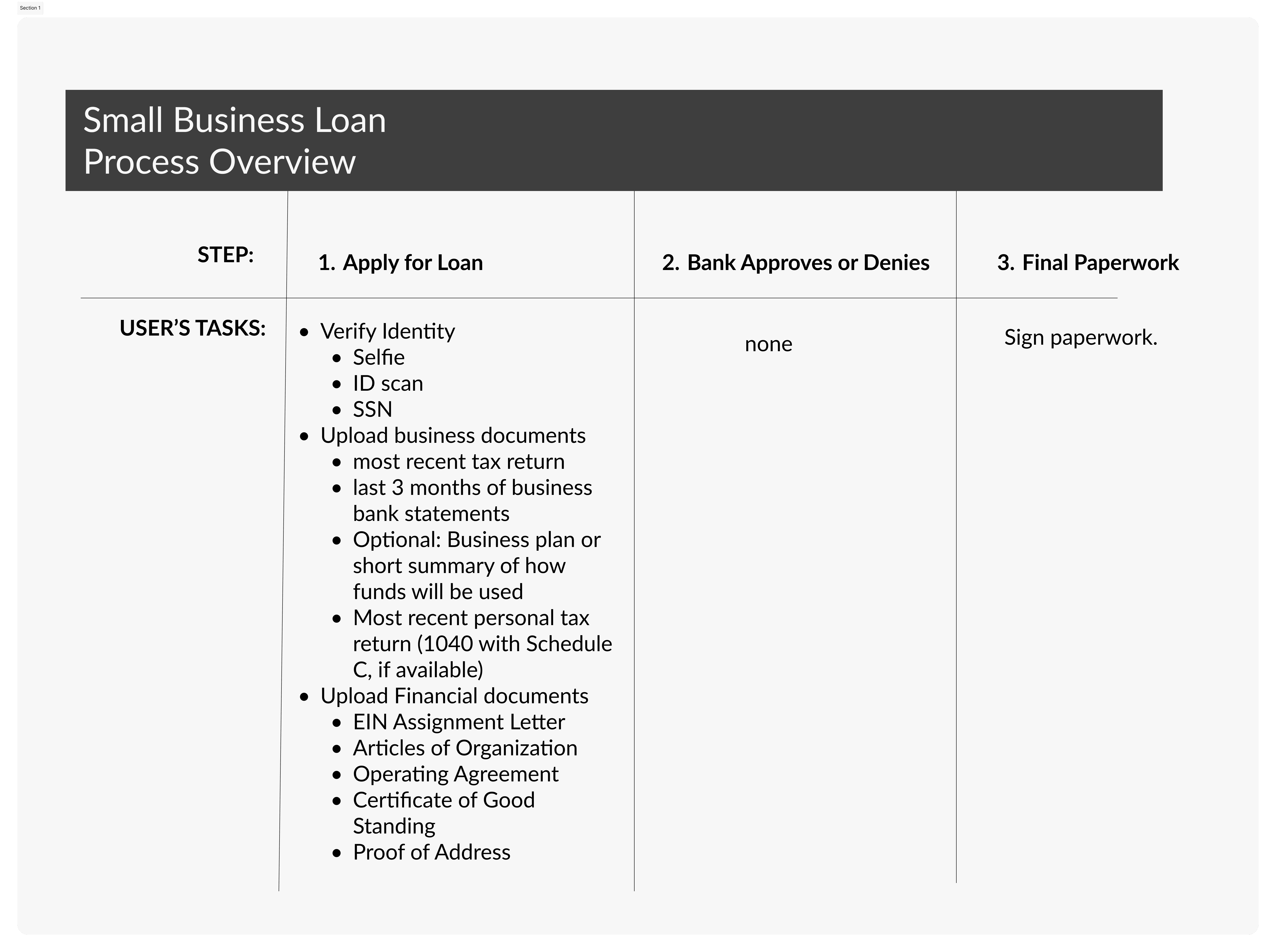
As you can see, the loan application steps are front-loaded at the start (which is why ZorroFi uses an AI chat solution). But the final two steps must also be clearly communicated so users understand their place in the process.
A Mismatch Between the System and User Expectations
Only the first phase of the loan application process was shown upfront, leading users to believe they were completing the entire application when they were actually just entering the process.
The system was designed as a staged workflow, but users approached it as a single, linear task—creating a disconnect between how the product worked and how it was understood.
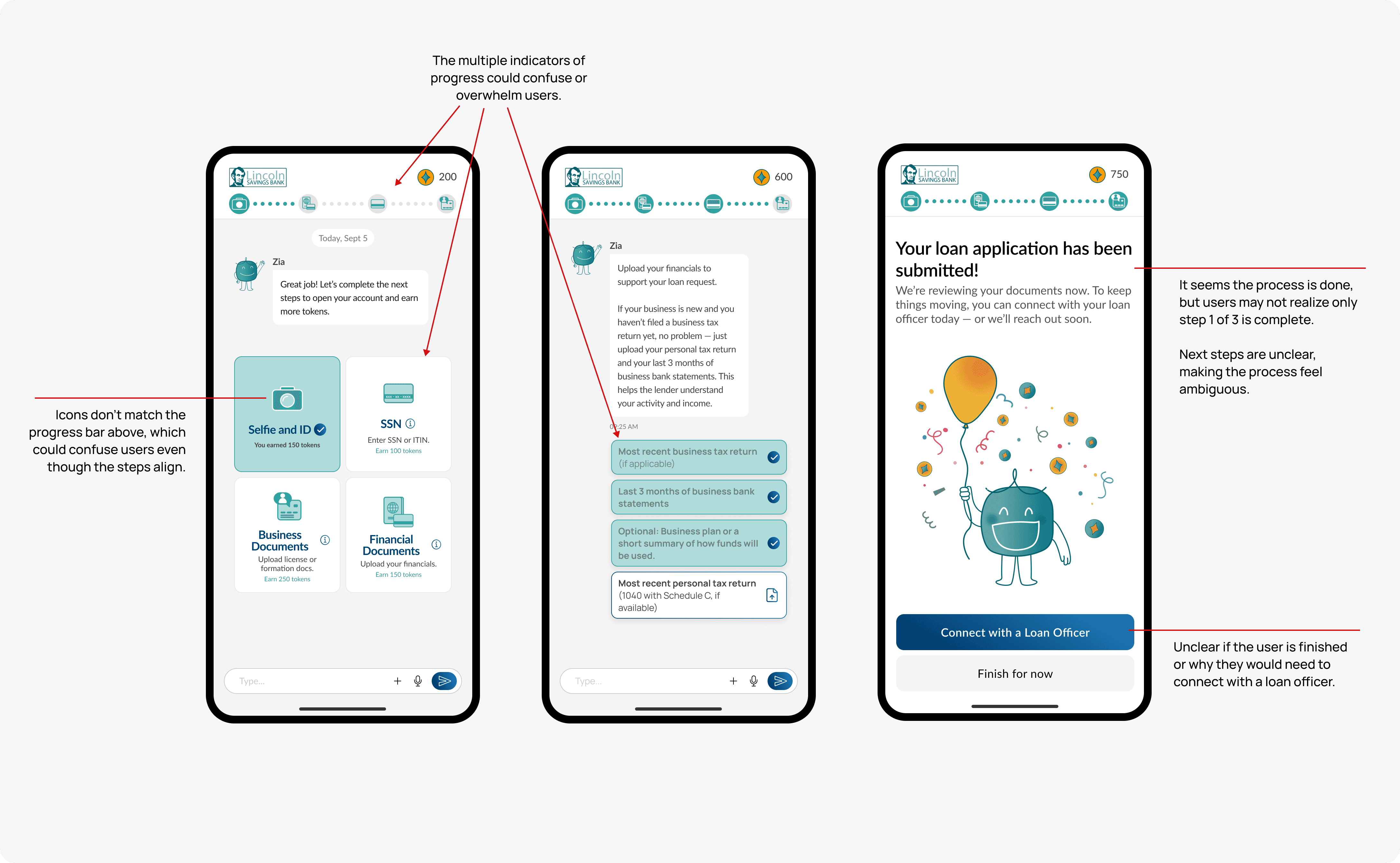
Why Hidden Steps Matter in Financial Workflows
In a financial context, users are sharing sensitive information and making high-stakes decisions. When steps are revealed late, surprise replaces confidence.
Waiting periods feel ambiguous, progress feels uncertain, and trust erodes quickly when users don’t know what’s coming next.
The Core Problem to Solve:
How can we make the full loan app journey visibile early on without overwhelming the user?
The Risk: Lost Trust and Momentum
The biggest risk wasn’t complexity—it was momentum. Confusion at this stage increased the likelihood of frustration or drop-off precisely when users needed reassurance that the process was moving forward.
The challenge was to make the full journey visible early, without overwhelming users or exposing every micro-step upfront.
02
Design Approach
Design Strategy
With the problems now clear, the goal was to make the three-phase loan journey visible upfront without overwhelming user. To guide the redesign, I defined clear principles:
Clarity first: Users should always understand where they are in the process.
Momentum matters: Progress should feel continuous, even during lender review periods.
Keep it simple: Only surface necessary steps and information; avoid overwhelming the user with micro-details.
Visual trust: Icons, colors, and layout should reinforce confidence and professionalism.
Key Decisions & Trade-offs
Clearly communicating the journey, without overload: Introduced a high-level tracker for the three phases, paired with a lightweight within-phase progress bar to show users their ongoing momentum.
Easy to understand language that builds trust: Iterated phrasing with founders to humanize the process: “You Submit → We Review → You Finalize ✅” to made responsibilities explicit.
Visual hierarchy & cognitive load: Redesigned icons, typography, and layout to guide the eye naturally and reassure users at a glance.
Rapid iteration: Worked within prototype constraints to deliver a polished solution quickly, without disrupting the existing workflow.
Exploration & Implementation (Hands-On Design Decisions)
Once the strategy was clear, I explored how to visually communicate the multi-phase process:
Faced two key design challenges:
Two progress bars were needed: one for the overall loan journey (You Submit → We Review → You Finalize ✅), and a second to show users progress within the first phase, which was the chat-based submission experience.
We could have forgone the within-phase progress tracker, but the founders emphasized that users needed feedback on their progress through the first, lengthy phase. I agreed—keeping users engaged and giving them a sense of “almost done” was critical to maintaining momentum.
Limited screen space: We had to fit the chat interface, content, and both progress trackers without overwhelming the user.
Problem: How should we word the overarching 3-phase loan application process?
Problem: How should we word the overarching 3-phase loan application process?
Option A:
Submit Your Information → Application Review → Finalize and Sign
Clear and descriptive, but felt formal and slightly long.
Option B:
Apply → Lender Review → Complete
Short, but too generic; didn’t reinforce user ownership or action.
Option C: **The Winner**
You Submit → We Review → You Finalize ✅
Landed here for clarity, simplicity, and the founders loved it.
Directly communicates who is responsible for each phase. Who does what is obvious now.
Easy to read at a glance
Friendly, human tone and language
Problem: How do we show progress in a clear, concise way?
S
Solution —> Paired overarching tracker with a lightweight within-phase progress bar to show momentum.
Explored multiple progress tracker options and styles: horizontal bars, step lists, and hybrid combinations.
Paired a high-level, overarching tracker with a lightweight within-phase tracker to address both needs.
Paired a high-level, overarching tracker (showing the three phases: You Submit → We Review → You Finalize ✅) with a lightweight within-phase tracker to indicate ongoing progress.
Problem: H
Solution —> P
Updated icons, typography, and layout to improve clarity, reduce cognitive load, and reinforce trust.
Updated visual design to improve trust, reduce cognitive load, and match the new hierarchy
03
Solution
Stacked Progress Trackers
The top tracker communicates the full three-phase journey upfront, so users always know where they are and who is responsible for each step. Directly beneath it, a lightweight progress bar shows movement within the current phase, keeping momentum visible without overwhelming the user.”
Visual Refresh
Updated UI reinforces trust and clarity. Consistent icons, typography, and spacing reduce cognitive load and support confidence in the process.
AI Chat Redesign
Goal: Simplify navigation, clarify hierarchy, and surface key actions clearly.
Design highlights:
Streamlined sidebars and dashboard layout to reduce clutter and cognitive load (addresses Navigation & Layout Overload)
Standardized CTAs, icons, and visual hierarchy for consistency across screens (Inconsistent Design & CTAs)
Improved spacing, headings, and card organization to make content easier to scan (Navigation & Layout / Readability)
Goal #2: UX Improvements
Reduce cognitive load: consolidate CTAs, simplify the Chat sidebar
Restructure home page to feel personalized (user profile insights, actionable items)
04
Handoff
Research
To uncover where users might feel friction or confusion, I conducted a comprehensive audit of Valence’s core experience—focusing on its two primary touchpoints: the AI chat interface (Nadia) and the user dashboard/home screen.
I approached the audit through the dual lens of usability and emotional engagement, asking questions such as:
Are the most important actions easy to find and perform quickly?
Is every interaction intuitive, and will users know what to do next without hesitation?
Does the interface feel clear, supportive, and approachable to someone new to Valence?
Do visual and interaction patterns reinforce trust in the AI coach, Nadia?
Each issue was categorized by impact level (high, medium, low) and issue type (design, usability, or functionality), creating a clear hierarchy of priorities for the redesign. This systematic approach allowed me to separate small inconsistencies from high-friction moments that disrupted trust and engagement—laying the groundwork for a focused, user-centered redesign.
05
Reflection
What Worked Well
This was such an enjoyable project to work on. I really valued the chance to deeply evaluate the current experience and identify areas where the product could better support its users
Conducting a detailed UX audit revealed key usability, design, and functionality gaps, providing a clear roadmap for how Valence could evolve.
Breaking down cognitive load and streamlining CTAs helped identify actionable ways to improve engagement and clarity. It also reaffirmed how much power there is in strong UX fundamentals: consistent visuals, clear hierarchy, and purposeful structure. Clarifying Nadia’s AI coaching value made the experience feel more intuitive and trustworthy, strengthening the platform’s overall impact.
Learnings
Enterprise platforms are complex ecosystems. Balancing advanced features, AI-driven insights, and the needs of diverse professional users requires thoughtful prioritization.
Designing for busy professionals reinforced the importance of immediate value and intuitive first interactions; users need to instantly see how the product helps them. I also learned that certain functionality improvements, such as enhancing how Nadia provides insights, depend on cross-functional alignment to bring the design vision to life.
Possible Next Steps
If I were to continue this project, I’d focus on creating a more personalized and intuitive experience for users. One key direction would be refining the Home screen to better reflect individual goals, recent activity, and coaching progress, making the experience feel more tailored and immediately valuable.
I’d also explore surfacing Nadia, the AI coach, right at entry. By making Chat the first interaction rather than starting on the Home screen, users could experience more guidance and connection from the moment they log in, helping to build trust and engagement faster.
I’d also love the opportunity to conduct A/B testing with different Home screen layouts and entry flows. Observing how users respond to variations would offer deeper insights into what feels most intuitive and motivating.