
Valence:
Redesigning an AI Coaching Platform for Trust and Clarity
reducing friction and increasing user confidence across key touchpoints.

Industry
Workplace Tech / HR Tech
Headquarters
San Francisco, CA
My Role
Product Designer
Skills Utilized
Heuristic Evaluation
UX Audit
Product Thinking
UI Design
Interaction Design
What is Valence?
Valence is a Y Combinator startup providing an AI-powered coaching platform for managers at Fortune 500 companies. The goal was to improve navigation, usability, and long-term user engagement.
Managers shape the everyday experience of work, but most don't have a coach beside them when difficult situations arise. I redesigned Nadia to provide timely, personalized guidance that helps managers make better decisions, communicate more effectively, and support their teams.
Challenge
Valence's enterprise platform, despite serving Fortune 500 clients, struggled with low daily active usage (only 23% of licensed users) and high support ticket volume, largely due to a confusing user experience. The key issues included:
Inconsistent Design Language: A lack of standardized buttons, colors, and visual elements created a fragmented and confusing interface.
High Cognitive Load: An overwhelming number of CTAs and unclear navigation led to user drop-off and frustration.
Low Perceived Value: Users struggled to understand the core AI functionality and lacked a clear, personalized path to success, which negatively impacted long-term engagement.
Solution
I conducted a comprehensive UX audit, analyzing user journeys, interface patterns, and core workflows. Through heuristic evaluation, I identified 8 critical usability violations including navigation confusion and inconsistent feedback systems. My research process included:
End-to-end user journey mapping across 5 core features
Heuristic evaluation using Nielsen's 10 principles
Interface inventory documenting design inconsistencies
Key Outcomes
Delivered 48 actionable recommendations that became the foundation of Valence's 2025 product roadmap:
Enhanced user confidence
Redesigned AI interaction patterns with clearer feedback loops
Enhanced user confidence
Redesigned AI interaction patterns with clearer feedback loops
Enhanced user confidence
Redesigned AI interaction patterns with clearer feedback loops
01
Research
Research: Uncovering 40 Key Issues
I conducted a UX audit of Valence’s core experience, focusing on the AI chat interface (Nadia) and the user dashboard.
I evaluated usability and emotional engagement, asking whether key actions were easy to find, interactions were intuitive, and the interface felt clear, supportive, and trustworthy.
The audit surfaced 40 issues, each categorized by:
Impact (High, Medium, Low)
Platform Area
Issue Type (Design, Usability, Functionality, Voice/Tone
This structured approach highlighted high-friction moments that disrupted trust, guiding a focused, user-centered redesign.
Key Questions Guiding the Audit
Do visual and interaction patterns reinforce trust in the AI coach, Nadia?
Is it clear what the platform offers and how to get value?
Does the interface feel clear, supportive, and approachable to someone new to Valence?
Are the most important actions easy to find and perform quickly?
Is every interaction intuitive, and will users know what to do next without hesitation?
Catalogue of Issues Found
Impact Level
Description of Issue
Platform Area
Type of Issue
🔴🔴🔴
Crowded sidebars create a cramped interface.
Navigation & Layout
🖐🏽 Usability issue
🔴🔴🔴
Right panel hierarchy is confusing and overwhelming.
Navigation & Layout
🖐🏽 Usability issue
🔴🔴🔴
Redundant CTAs (“Chat with Nadia” / “Talk about this”) create clutter.
CTAs & Actions
🖐🏽 Usability issue
🔴🔴🔴
Voice chat lacks the ability to edit misheard transcriptions.
Interactions & Feedback
🛠️ Functionality issue
🔴🔴🔴
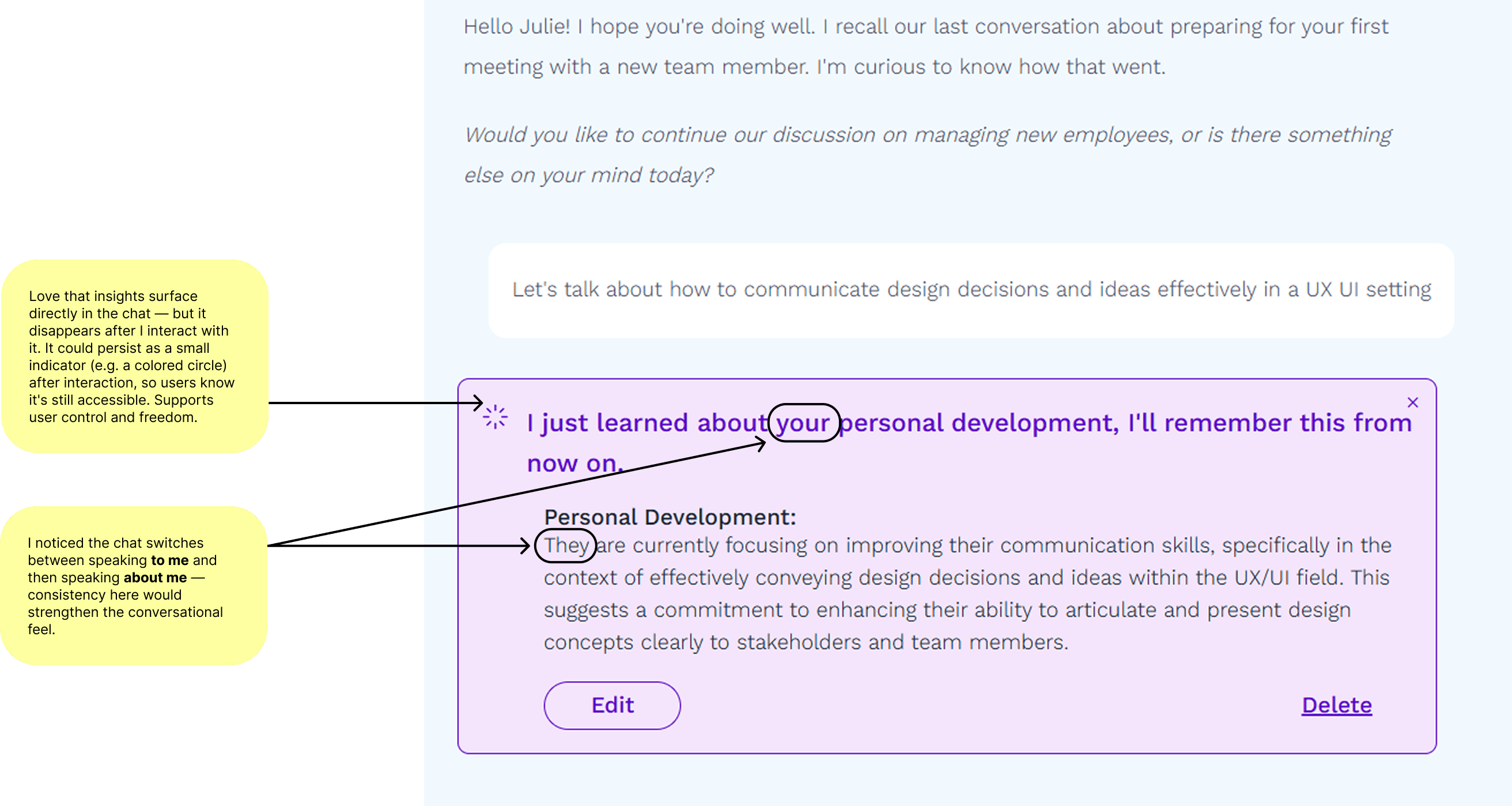
Interactable elements disappear after use, limiting user control.
Interactions & Feedback
🖐🏽 Usability issue
🔴🔴🔴
Wrap Up & Recap flow presents too many decisions and ends ambiguously; “Close” button is unclear.
Interactions & Feedback
🖐🏽 Usability issue
🔴🔴🔴
Home page prompt cards provide no confirmation of answers; blank submissions can be logged.
Notifications & Prompt Cards
🛠️ Functionality issue
🟠🟠
Side nav overloaded with information; could be simplified or moved to a dedicated “My Profile” page.
Navigation & Layout
🖐🏽 Usability issue
🟠🟠
Home page is text-heavy and not visually engaging.
Navigation & Layout
🖐🏽 Usability issue
🟠🟠
Loading states are inconsistent visually.
Navigation & Layout
🖐🏽 Usability issue
🟠🟠
CTA style, color, and tone inconsistent across the platform.
Navigation & Layout
🖐🏽 Usability issue
🟠🟠
Check-in modal toggle placement unclear; options ambiguous (weekly vs one-time).
Navigation & Layout
🖐🏽 Usability issue
🟠🟠
Pink mic CTA button doesn’t clearly indicate it starts voice input.
Navigation & Layout
🖐🏽 Usability issue
🟠🟠
Nadia AI bot is inconsistent in using first- and third-person language.
Navigation & Layout
🖐🏽 Usability issue
🟠🟠
Chat alternates between speaking to and about the user. Should be consistent.
AI Content
💬 Voice/Tone
🟠🟠
Chat content is dense and difficult to digest.
AI Content
🖐🏽 Usability issue
🟠🟠
“Focus Areas” insights section could be communicated better to enhance user understanding.
AI Content
🖐🏽 Usability issue
🟠🟠
Modal and card wording is confusing/unclear.
AI Content
🖐🏽 Usability issue
🟠🟠
“Click to view/Click to close” is inconsistent with the plus/minus icons.
Interactions and Feedback
🎨 Design issue
🟠🟠
It is unclear what the notifications are for when the icon is clicked.
Notifications & Prompt Cards
🛠️ Functionality issue
🟠🟠
“Coaching Mode” feature is not obvious enough.
Misc.
🖐🏽 Usability issue
🟠🟠
Confusing or awkward wording on certain modals and buttons
Visual Design
🖐🏽 Usability issue
🟡
Section headings are too small; improve text hierarchy.
Navigation & Layout
🎨 Design issue
🟡
Large gap sometimes appears at the bottom of the chat.
Navigation & Layout
🛠️ Functionality issue
🟡
Dashboard header alignment feels off; left-aligning would improve readability and hierarchy clarity.
Navigation & Layout
🖐🏽 Usability issue
🟡
Awkward spacing between title and CTA on the Dashboard
Navigation & Layout
🖐🏽 Usability issue
🟡
Gray tag color too dark; lighter tone would better match visual hierarchy and contrast expectations
Visual Design
🖐🏽 Usability issue
🟡
Schedule card visual hierarchy unclear on first glance; icon and text treatment need refinement
Visual Design
🖐🏽 Usability issue
🟡
Modal color inconsistency (orange vs pink) creates confusion in visual language and hierarchy
Visual Design
🖐🏽 Usability issue
🟡
Right side panel close icon inconsistent with left-side collapse arrows; affordance not obvious
Visual Design
🖐🏽 Usability issue
🟡
Lock icon feels negative; consider clock/timer icon to indicate next check-in.
Notifications & Prompt Cards
🎨 Design issue
🟡
Unrealistic time estimates (“Takes 4 mins”) could reduce user trust.
Misc
💬 AI Content issue
🟡
Days of the week display inconsistent between main view and modal view.
Interactions & Feedback
🎨 Design issue
Research Takeaways
Navigation & Layout Overload
Insight: Cramped sidebars, dashboards, and text-heavy screens make key actions hard to find and content difficult to digest.
Business Impact: Users may miss important features, reducing adoption and engagement. For enterprise clients, this confusion can signal lack of polish or professionalism.
Inconsistent Design and CTAs
Insight: CTA styles, icons, and visual hierarchy are inconsistent across the platform.
Business Impact: Inconsistency erodes trust; enterprise clients may question product quality, while new users experience friction in decision-making.
AI Content and "Voice" Issues
Insight: Nadia alternates between first- and third-person language, and key content like “Focus Areas” is dense or unclear.
Business Impact: Confusing language reduces user confidence in AI recommendations, limiting adoption and retention. Inconsistent messaging can make the platform feel less reliable to paying clients.
Important interactions lack confirmation or control
Insight: Disappearing elements, unclear toggles, and ambiguous notifications leave users uncertain if actions are completed.
Business Impact: Lack of clear feedback creates frustration, undermining trust and potentially increasing support tickets or churn.
02
Ideation
Content Redesign at a Glance
I took the 4 Research Takeaways and formed How Might We Questions to consider how we might address these issues in the redesign:
Navigation & Layout → How might we make key actions easy to find and reduce visual clutter?
Inconsistent Design & CTAs → How might we create a consistent visual and interaction language across the platform?
AI Content & Voice → How might we build trust through clear, consistent messaging?
Interaction & Feedback → How might we ensure users know the result of every action they take?
Brainstorming
Sidebar redesigns: collapsed vs tabbed vs progressive disclosure
03
Design
The audit revealed high-impact issues that disrupted navigation, consistency, messaging, and user confidence.
The redesign focused on Valence’s two main touchpoints — the Dashboard and the AI Chat interface — ensuring that each solution directly addressed the audit insights and improved both usability and perception of quality.
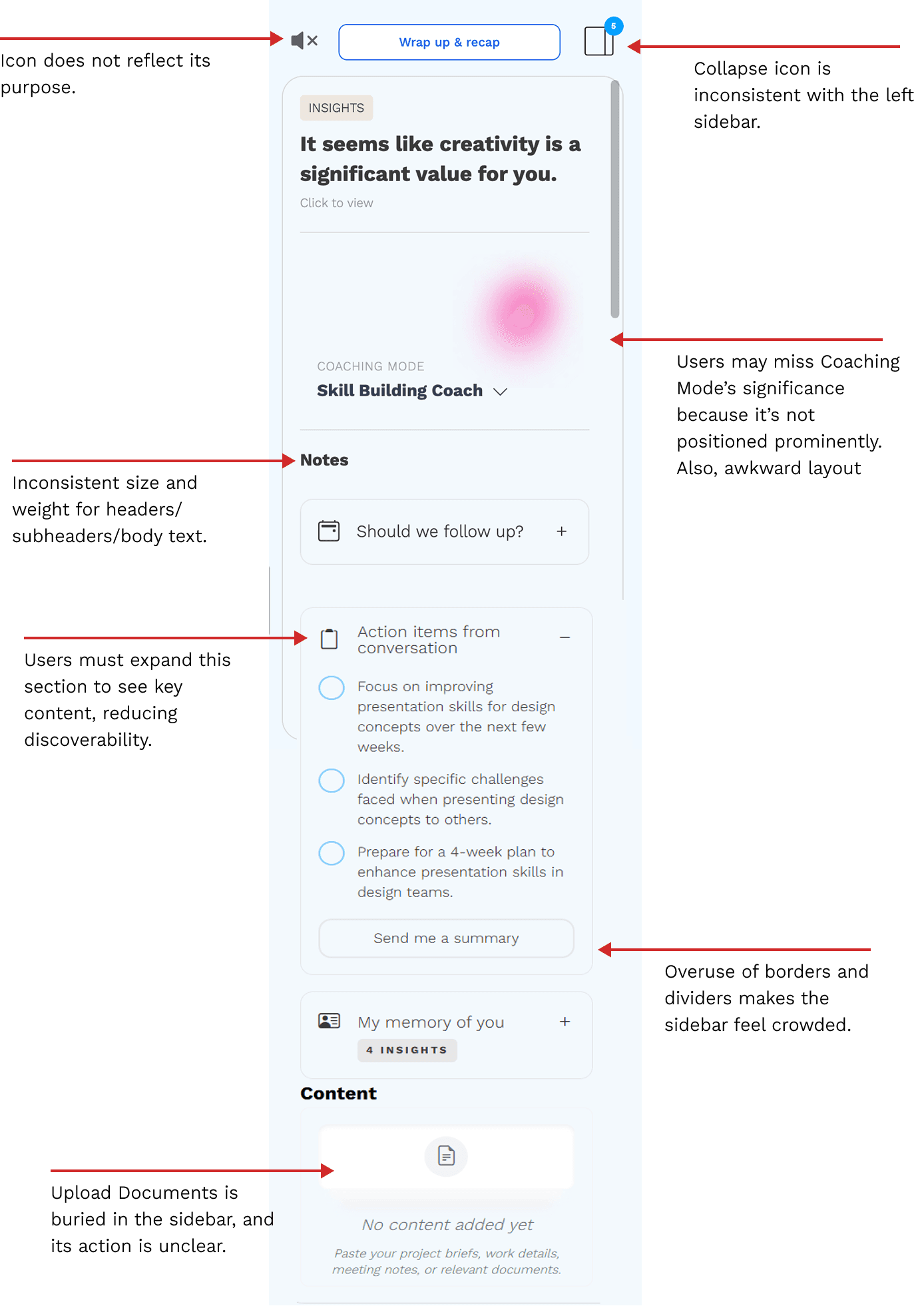
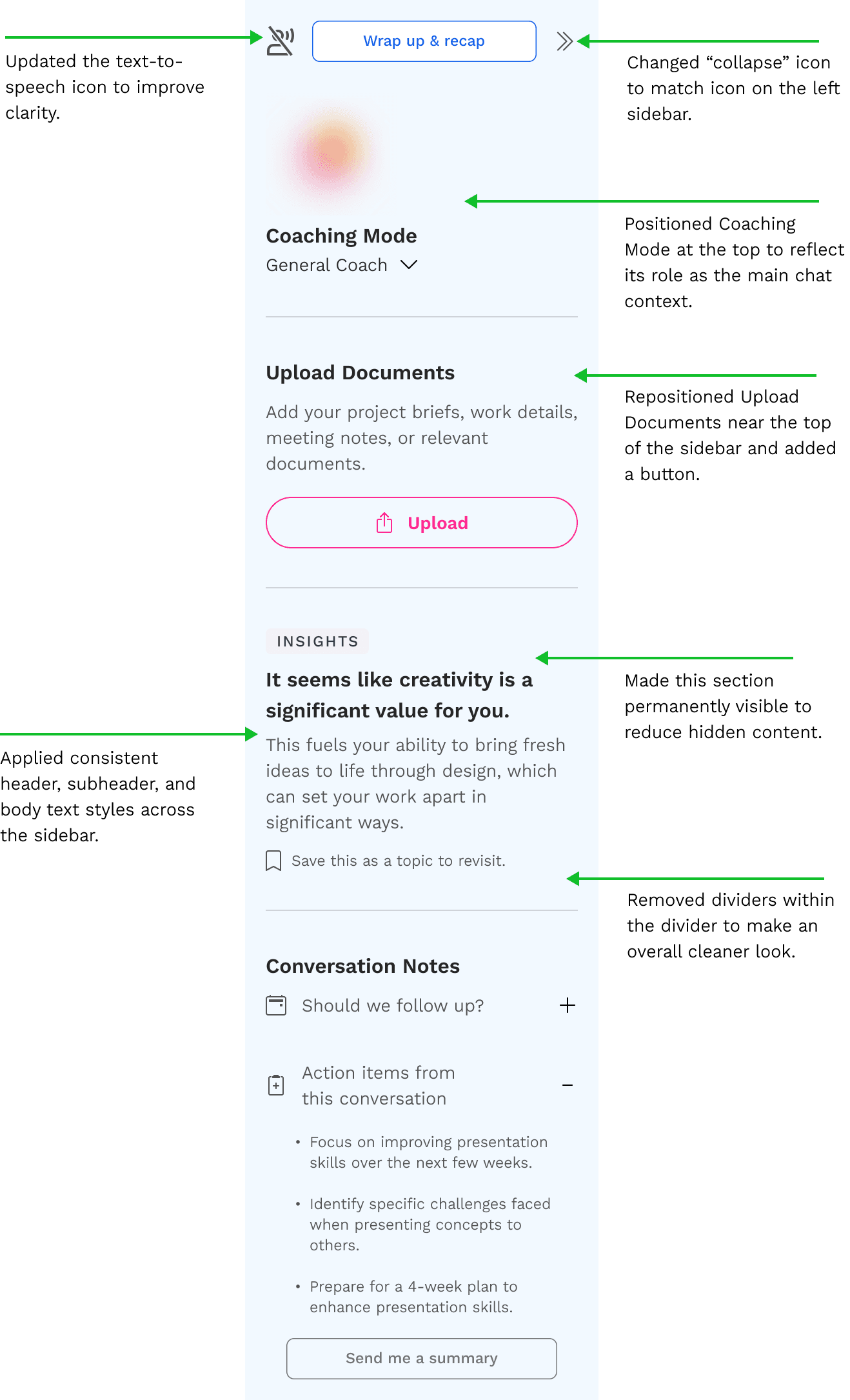
Redesigning the Chat Side Panel
The chat side panel contained valuable information — but none of it felt that way.
Competing font sizes, inconsistent visual elements, and a lack of clear hierarchy left users with no obvious place to focus. Important actions were buried alongside secondary content, creating a cluttered experience that worked against the platform's goal of feeling like a polished, trustworthy enterprise tool.
The redesign focused on three things: establishing clear visual hierarchy, creating breathing room, and making the most important actions immediately obvious.
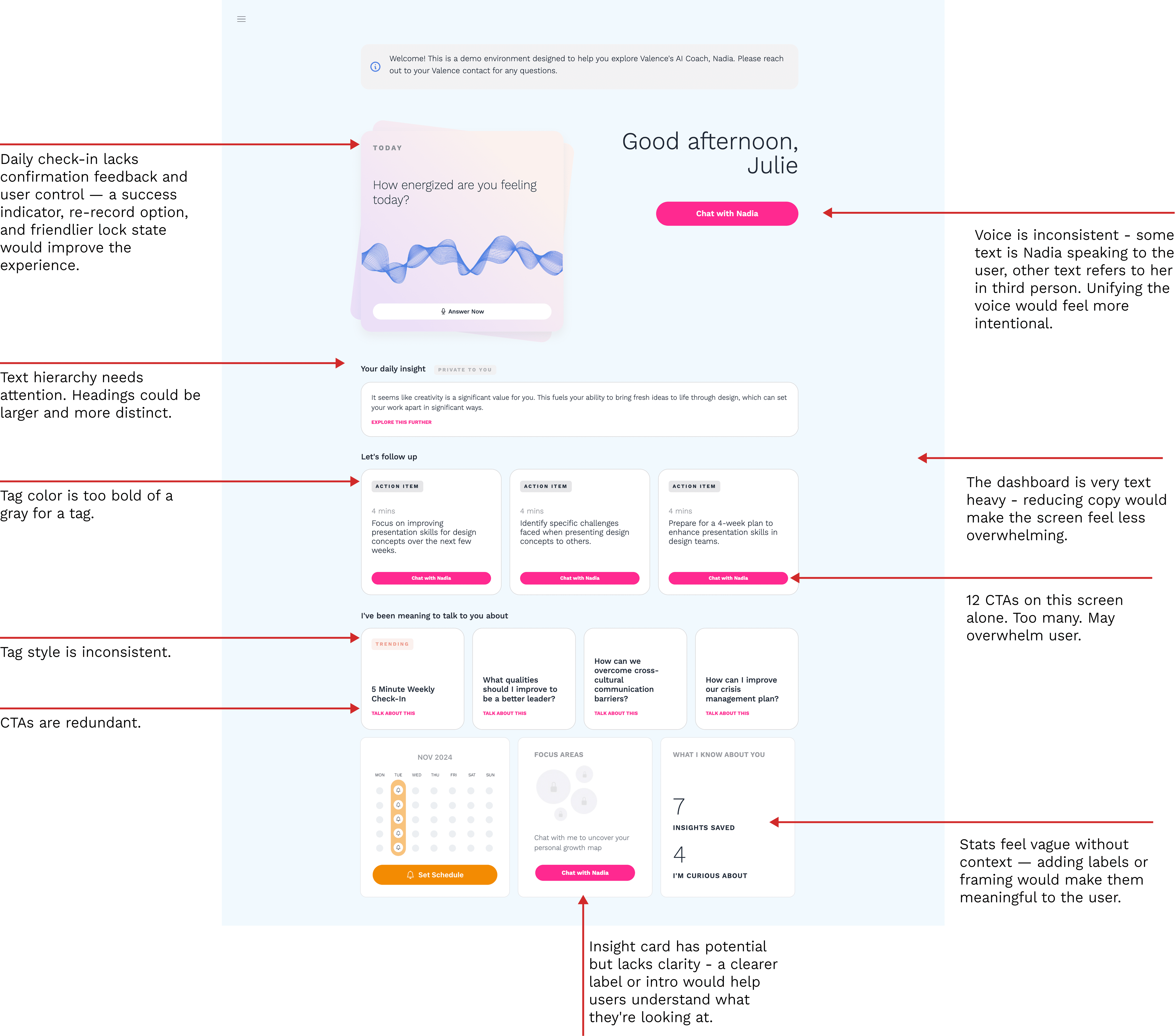
Redesigning the Dashboard
The chat side panel contained valuable information — but none of it felt that way.
Competing font sizes, inconsistent visual elements, and a lack of clear hierarchy left users with no obvious place to focus. Important actions were buried alongside secondary content, creating a cluttered experience that worked against the platform's goal of feeling like a polished, trustworthy enterprise tool.
The redesign focused on three things: establishing clear visual hierarchy, creating breathing room, and making the most important actions immediately obvious.

Beyond Visuals: AI Voice & Behavior Recommendations
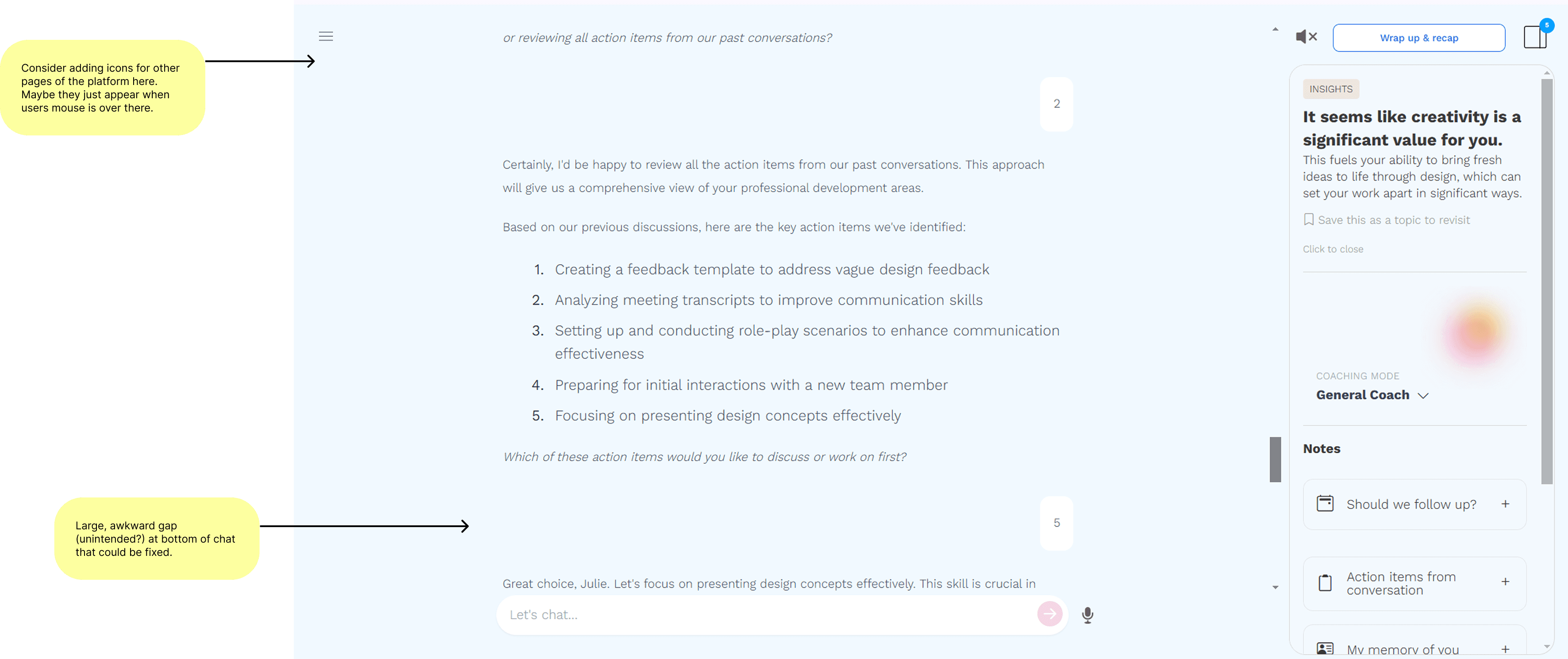
Rather than a visual redesign, these findings were documented and delivered to the Valence team as conversational design recommendations.
Nadia — Valence's AI coaching assistant — had the right idea, but the execution created friction that undermined the conversational experience. Beneath the visual interface was a deeper layer of problems — not visual design issues, but conversational design ones.
What wasn't working:
Inconsistent voice — Nadia alternated between speaking to the user and speaking about them
Italicized text that felt more like a document than a real conversation
No contextual awareness — Nadia didn't acknowledge what the user had just clicked or done
Insight cards that disappeared after interaction, removing user control
Nadia led with questions instead of value — busy managers need fast, useful responses first
My recommendations focused on making the chat feel more like a conversation and less like a document:
Consistent second-person voice throughout
Plain conversational text formatting
Contextual responses tied to user actions
Persistent insight cards so valuable moments stay accessible
Prioritize insights upfront, then follow with clarifying questions
Small changes — but ones that make the difference between an AI that feels alive and one that feels like a form letter.
Issues Called Out:
04
Impact
Unlocking a Better Experience
While final outcomes were not captured during my time on the project, the redesign was expected to drive meaningful improvements in key areas:
Fewer support tickets
By simplifying navigation, clarifying workflows, and providing clear feedback on user actions, the redesign reduces moments of confusion. This will make it easier for users to complete tasks independently, decreasing the number of support inquiries and letting the Valence team focus on higher-value work.
Higher user engagement
By making the platform easier to navigate and its value clearer, users are more likely to return regularly. Streamlined flows and a more intuitive interface encourage daily interaction, helping managers integrate Valence into their routine and derive consistent value from the AI coaching experience.
Stronger professional perception of Valence
Standardized design and consistent AI messaging reinforce trust and demonstrate value to enterprise clients.
Improved user satisfaction
Simplified workflows, consistent design patterns, and clear feedback make the platform feel intuitive and approachable. Users can focus on completing tasks rather than figuring out how the interface works, creating a smoother, more enjoyable experience that builds confidence and trust in the product.
More efficient interactions
Streamlined workflows reduce the clicks needed for users to complete core tasks.
05
Reflection
What Worked Well
This was such an enjoyable project to work on. I really valued the chance to deeply evaluate the current experience and identify areas where the product could better support its users
Conducting a detailed UX audit revealed key usability, design, and functionality gaps, providing a clear roadmap for how Valence could evolve.
Breaking down cognitive load and streamlining CTAs helped identify actionable ways to improve engagement and clarity. It also reaffirmed how much power there is in strong UX fundamentals: consistent visuals, clear hierarchy, and purposeful structure. Clarifying Nadia’s AI coaching value made the experience feel more intuitive and trustworthy, strengthening the platform’s overall impact.
Learnings
Enterprise platforms are complex ecosystems. Balancing advanced features, AI-driven insights, and the needs of diverse professional users requires thoughtful prioritization.
Designing for busy professionals reinforced the importance of immediate value and intuitive first interactions; users need to instantly see how the product helps them. I also learned that certain functionality improvements, such as enhancing how Nadia provides insights, depend on cross-functional alignment to bring the design vision to life.
Possible Next Steps
If I were to continue this project, I’d focus on creating a more personalized and intuitive experience for users. One key direction would be refining the Home screen to better reflect individual goals, recent activity, and coaching progress, making the experience feel more tailored and immediately valuable.
I’d also explore surfacing Nadia, the AI coach, right at entry. By making Chat the first interaction rather than starting on the Home screen, users could experience more guidance and connection from the moment they log in, helping to build trust and engagement faster.
I’d also love the opportunity to conduct A/B testing with different Home screen layouts and entry flows. Observing how users respond to variations would offer deeper insights into what feels most intuitive and motivating.